Revamping navigation to increase CTR to content
Revamping navigation to increase CTR to content
About Educative
Educative is a platform that helps software engineers learn technical skills via interactive, self-paced and personalized courses and prepare for interviews at MAANG+, powered by an adaptive learning engine.
Educative’s top navigation “Explore” dropdown was a critical discovery surface for users. However, it was underperforming in driving users to courses and practice content. I led a revamp of the Explore dropdown to increase CTR to content and improve discoverability of Educative’s full value proposition.
To comply with my non-disclosure agreement, I have omitted confidential information in this case study.
MY ROLE
As Product Design Lead, I:
TIMELINE
October 2025
1 week, problem identification to handoff
MY PROCESS
TLDR ⬇️
Educative’s “Explore” dropdown was the main discovery surface in the top navigation, but it was hiding content behind multiple clicks, listing technologies without hierarchy and communicating almost none of Educative’s value beyond courses.
In one week, I ran a behavior-led problem analysis and competitive study, then re-architected the dropdown into a three-layer mega menu - Learn / Practice / Get Hired, then Topics, then actual course titles with Top Pick, Free and Trending tags. Real content now sits inside the menu, so reaching a course takes one click instead of three. I designed it across desktop and mobile, light and dark mode, and for worst-case content lengths, iterating with the squad and leadership before engineering handoff.
A glimpse of the impact of my efforts in collaboration with the squad:
01. Problem Identification
The Explore dropdown sat in the top navigation on every page, which made it one of the highest-intent surfaces on the site. Looking at how people actually moved through it, the previous version was limiting and inefficient in four distinct ways.
Content was hidden behind multiple clicks
Three steps stood between intent and content, at exactly the moment a user was most ready to engage.
Scattered & unstructured options
Weak value communication
Cloud Labs, Projects, Mock Interviews and Adaptive Learning were invisible in the menu.
Low scannability
The menu wasn’t helping users make quick decisions.
How might we..
turn the Explore dropdown from a list of links into a surface that shows real content, communicates everything Educative offers, and gets users into a course in a single click?
02. Goal Definition
Based on the problems above, the squad and I agreed on four goals to design against:
Surface real content directly in the dropdown
Reduce accessing courses and other content to 1 click
Use hierarchy and grouping to guide decisions
Reinforce product value within the navigation itself
03. Competitive Analysis
I studied companies using mega menus effectively. A clear pattern emerged:
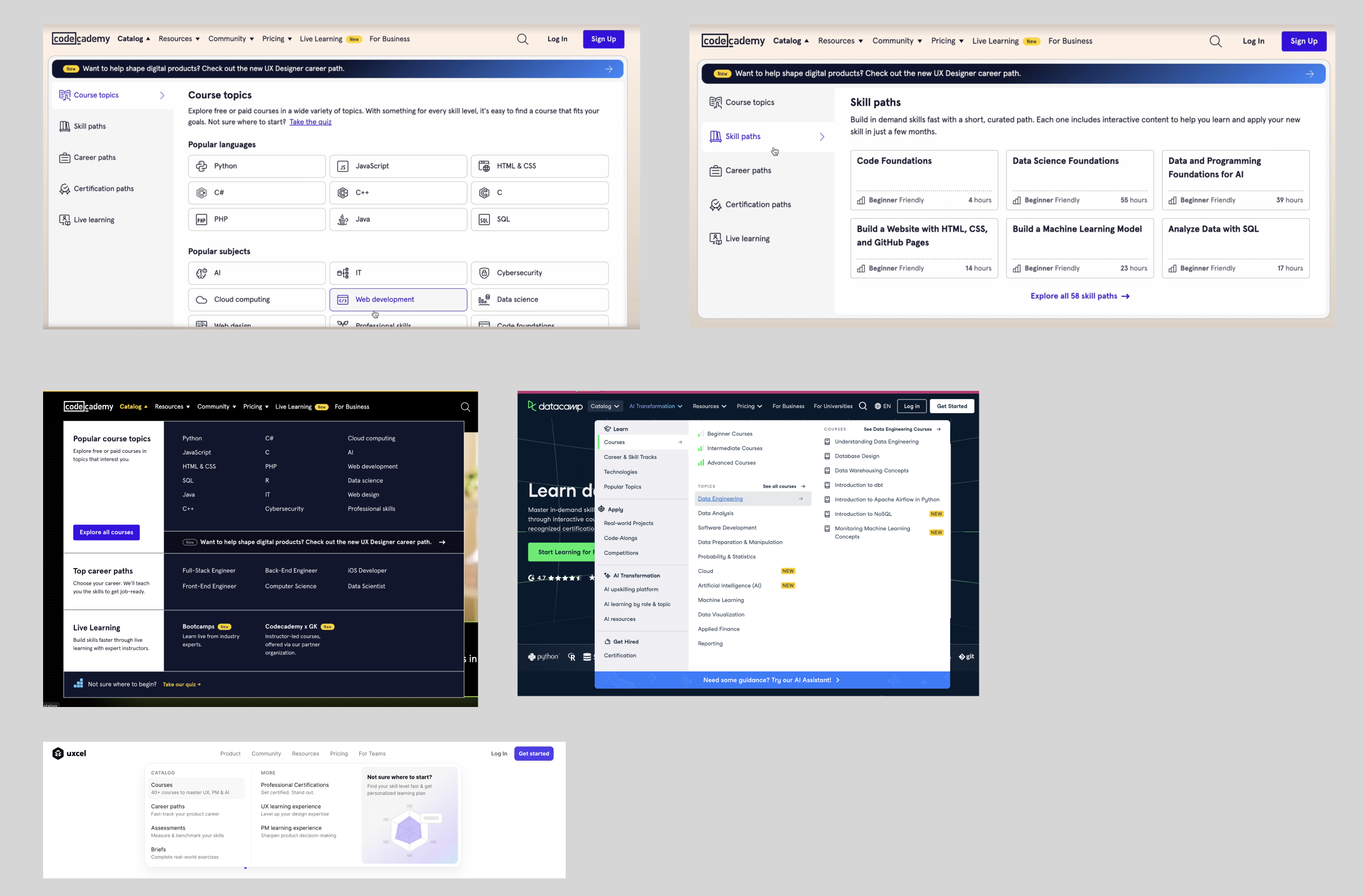
Mega menu patterns I studied across Codecademy, DataCamp and Uxcel - each one surfaces real content and frames its offering inside the menu itself
04. Information Architecture Redesign
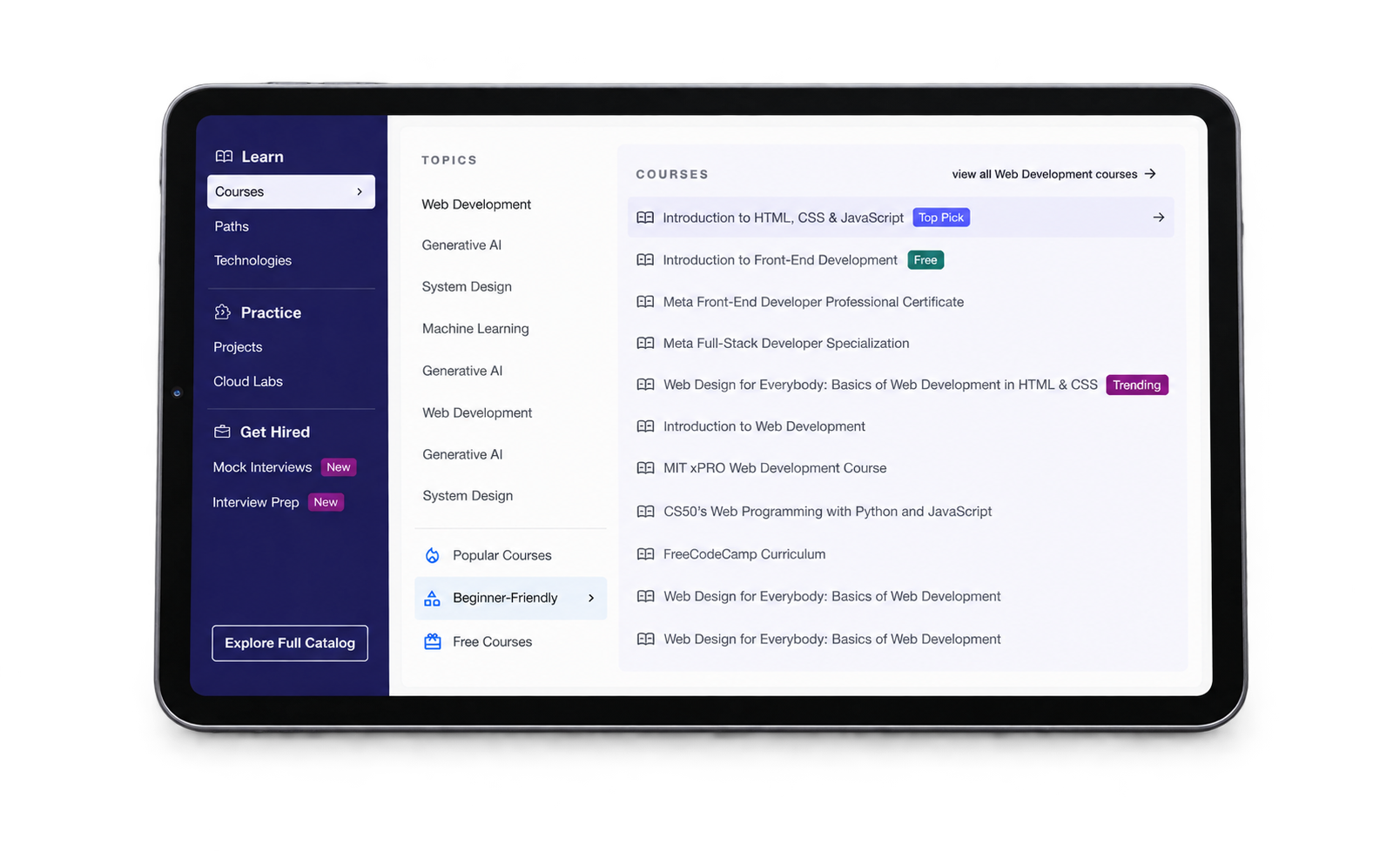
In close collaboration with the entire squad - PM, engineering and content authors - I restructured the dropdown into three layers, each one answering a different question the user is asking.
Primary navigation
Immediately communicates Educative’s ecosystem - the Learn → Practice → Get Hired narrative that was missing entirely before.
Topics
Clear categorization for faster scanning, replacing the flat list of isolated technologies.
Courses & content
Users can now enter a course straight from the dropdown - the single biggest change to the experience.
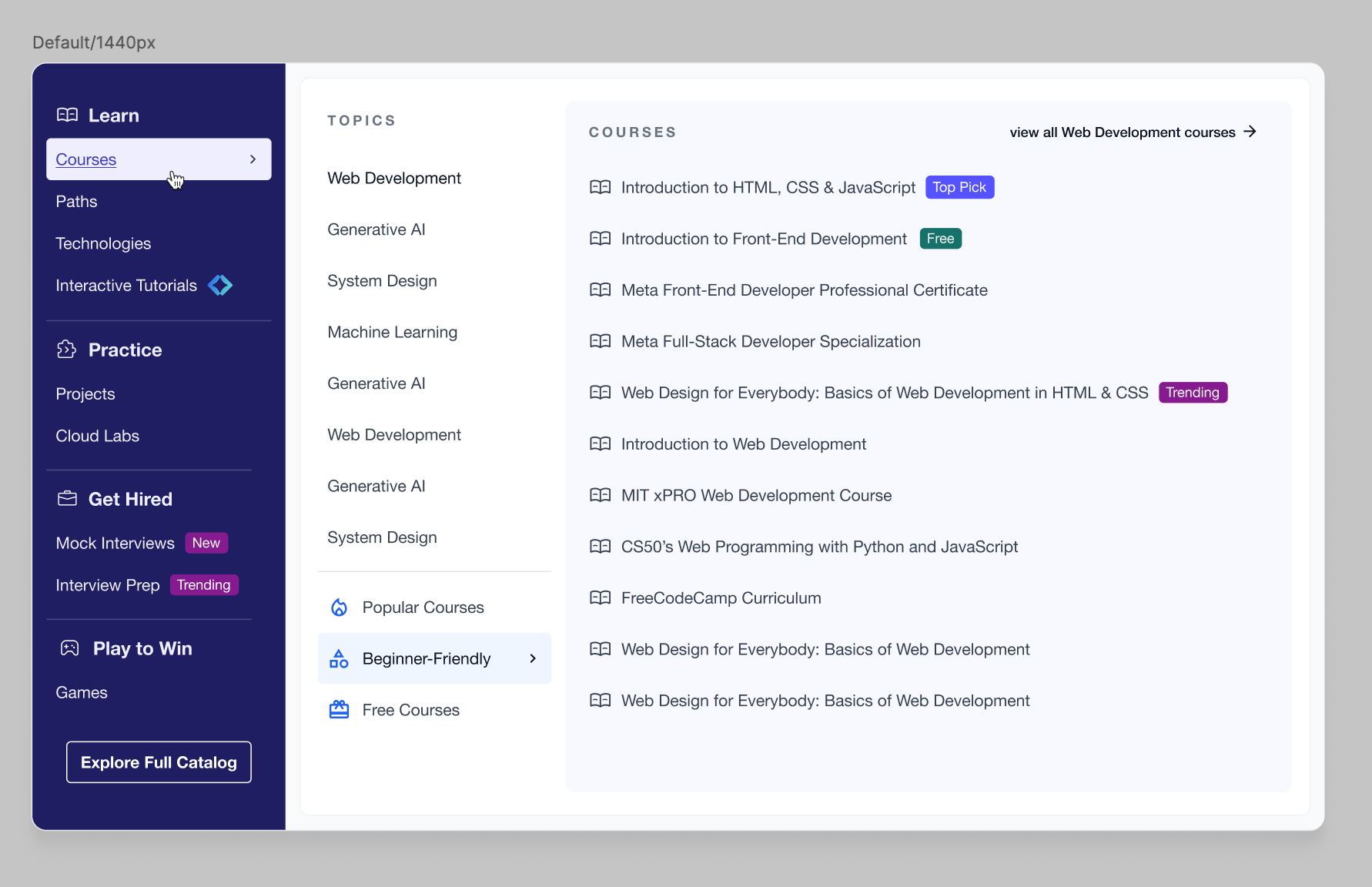
All three layers working together - ecosystem on the left, topics in the middle, and real course titles with priority tags on the right
05. Designing for Speed & Clarity
A navigation menu is read in a glance, not studied. Everything in the design had to earn its place in that glance, so I focused heavily on:
06. Designing for Edge Cases
A mega menu that only works with tidy content isn’t really done. I designed for:
Designing the worst case first meant engineering never had to guess what happens when content grows - nothing breaks visually.
07. Design Iterations ✏️
The final menu took five passes, shaped by feedback from the squad and leadership - and in one case, by disagreeing with my own preference.
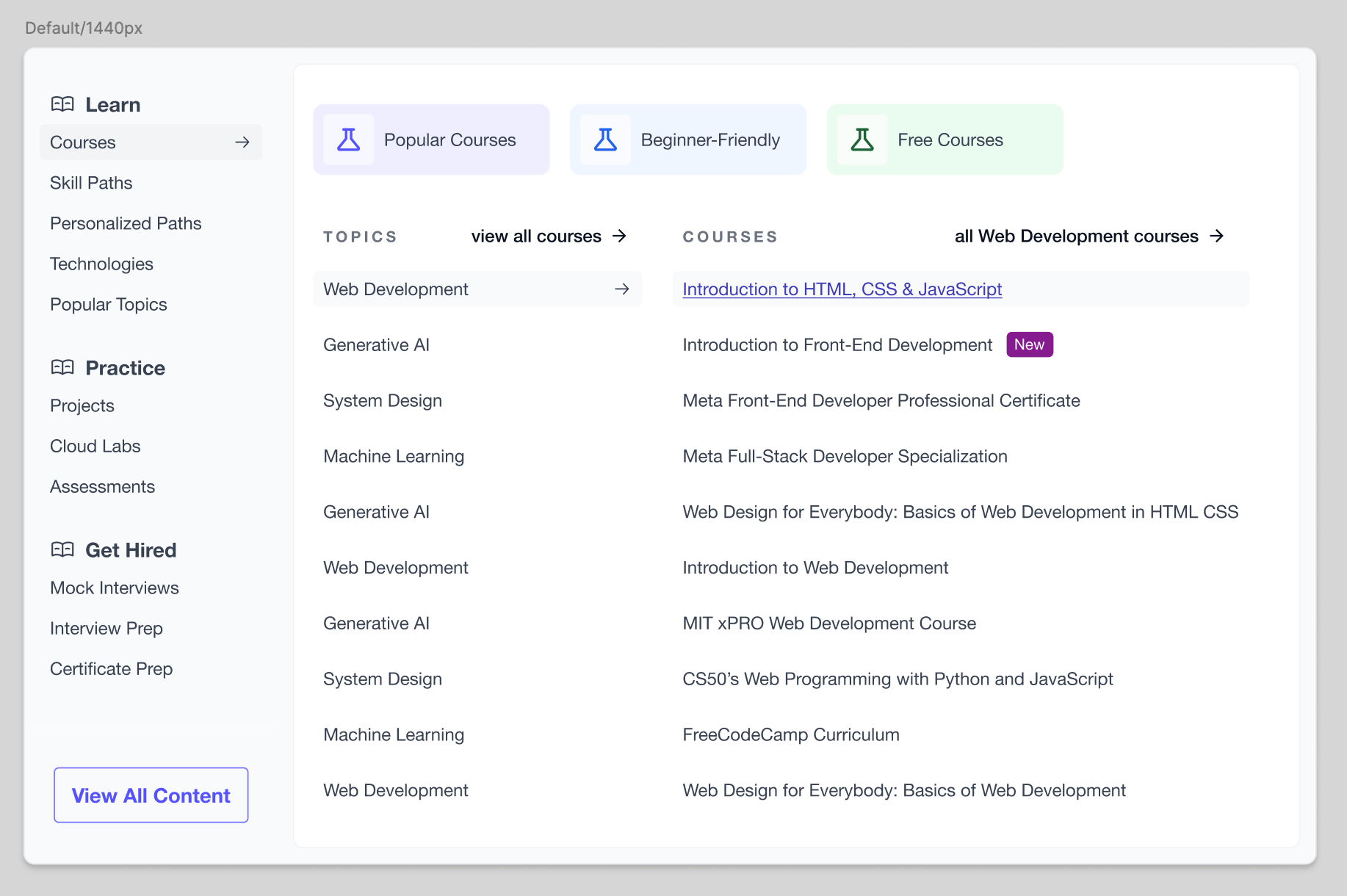
01. A MINIMAL BENTO START
The initial version of the mega menu featured a very minimal bento-style design, playing with light colors.
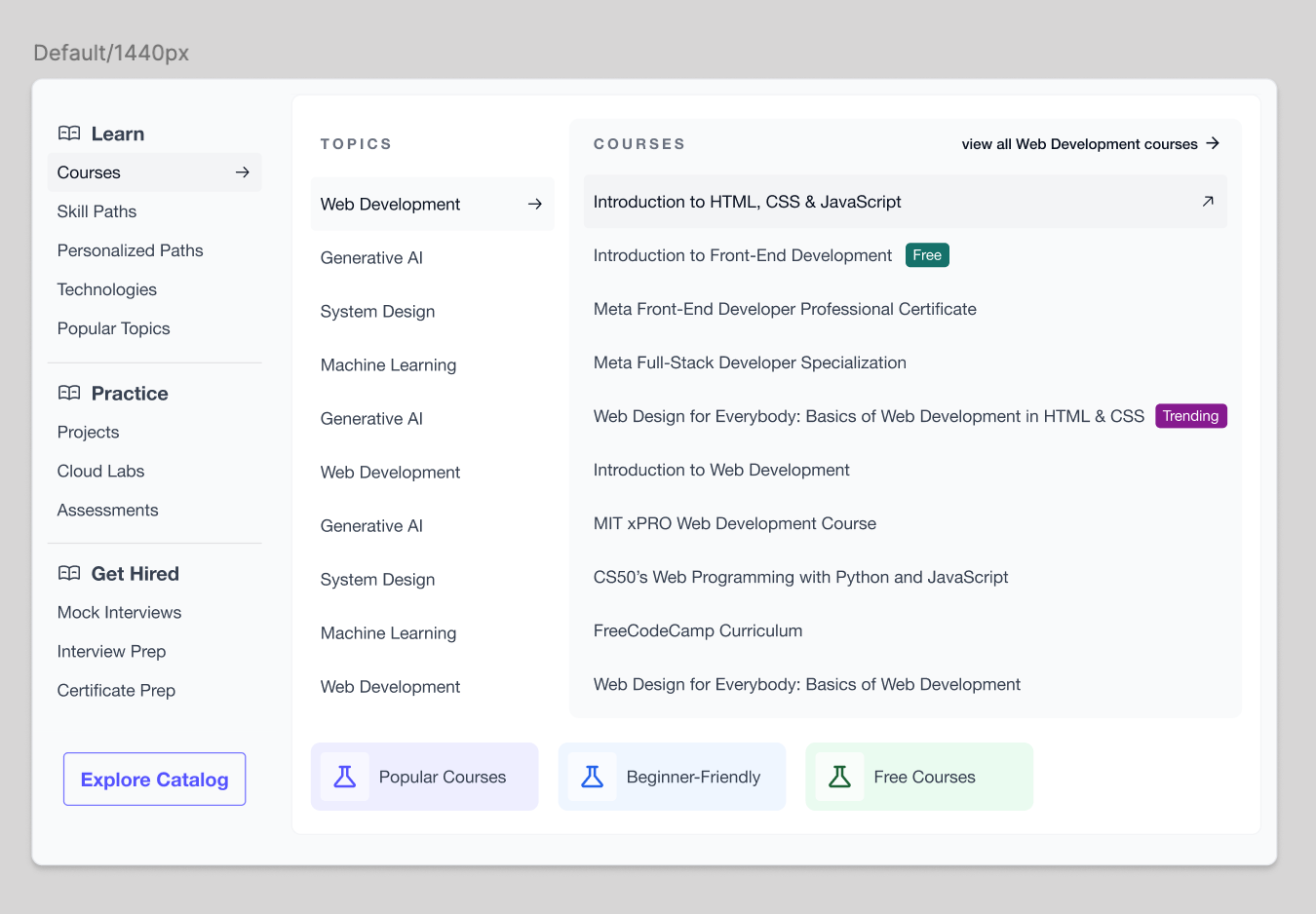
02. SHORTENING THE CURSOR TRAVEL
Next I moved the Popular, Beginner-Friendly and Free Courses buttons below the main content, so the cursor would travel a shorter distance moving from L1 to L2.
03. ADDING COLOR TO LAYER 1
I received early feedback from the squad that the design looked too minimal, and that color would help the L1 categories stand out and feel like a menu. Although I personally preferred the minimal design, I gave a darker L1 section a try - and for visual balance, removed the colored backgrounds from the Popular, Beginner-Friendly and Free buttons.
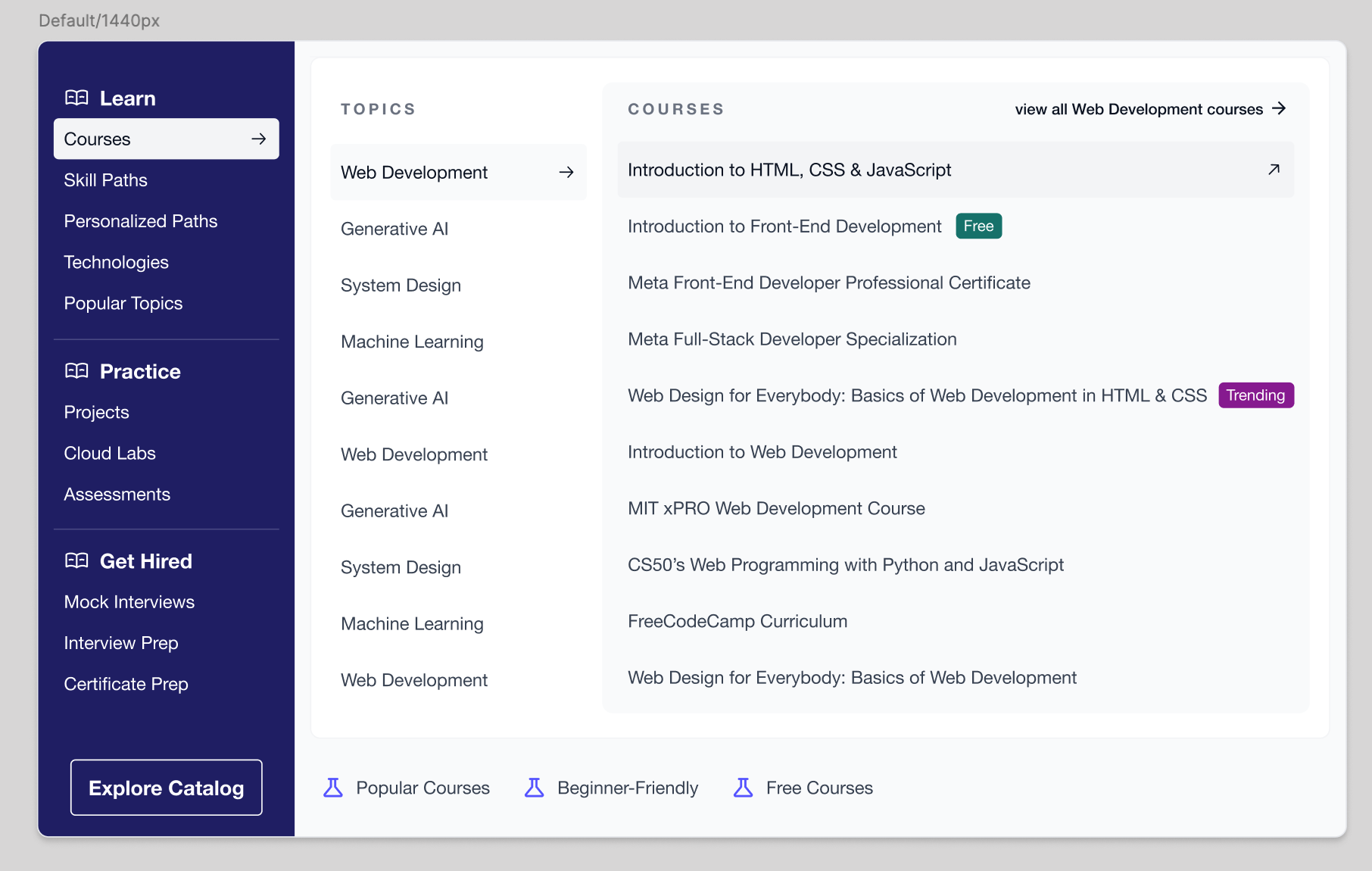
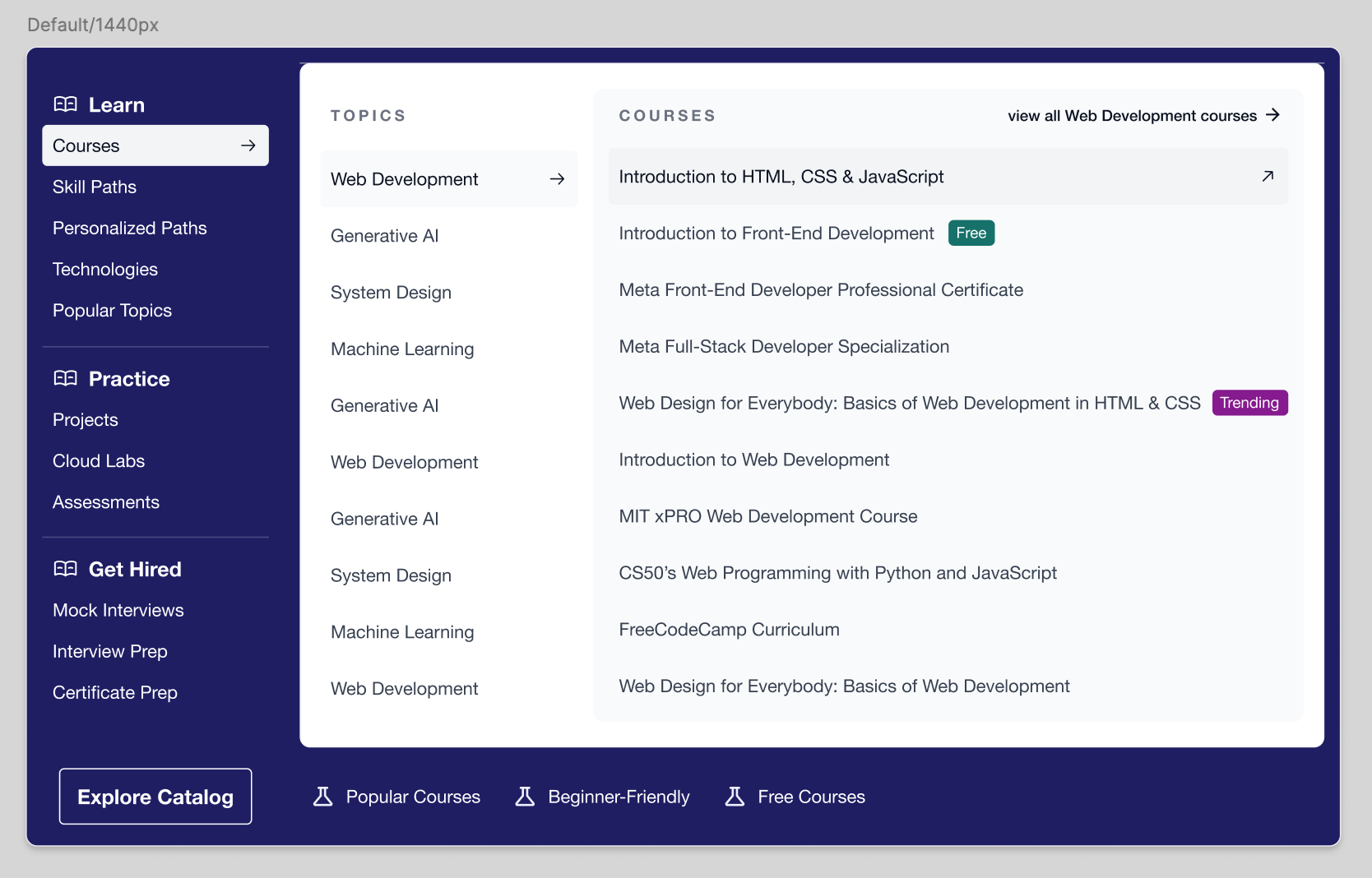
04. A DARKER OUTER LAYER, REJECTED
A darker outer layer was also tried as an experiment, but I rejected the idea myself - the surrounding dark outline and high contrast looked and felt quite odd.
05. MAKING LAYER 3 UNMISSABLE
Leadership flagged that the L3 courses container was quite subtle and might be missable, especially on lower resolution screens. I experimented with a light purple shade from our design system to distinguish it from L2 topics.
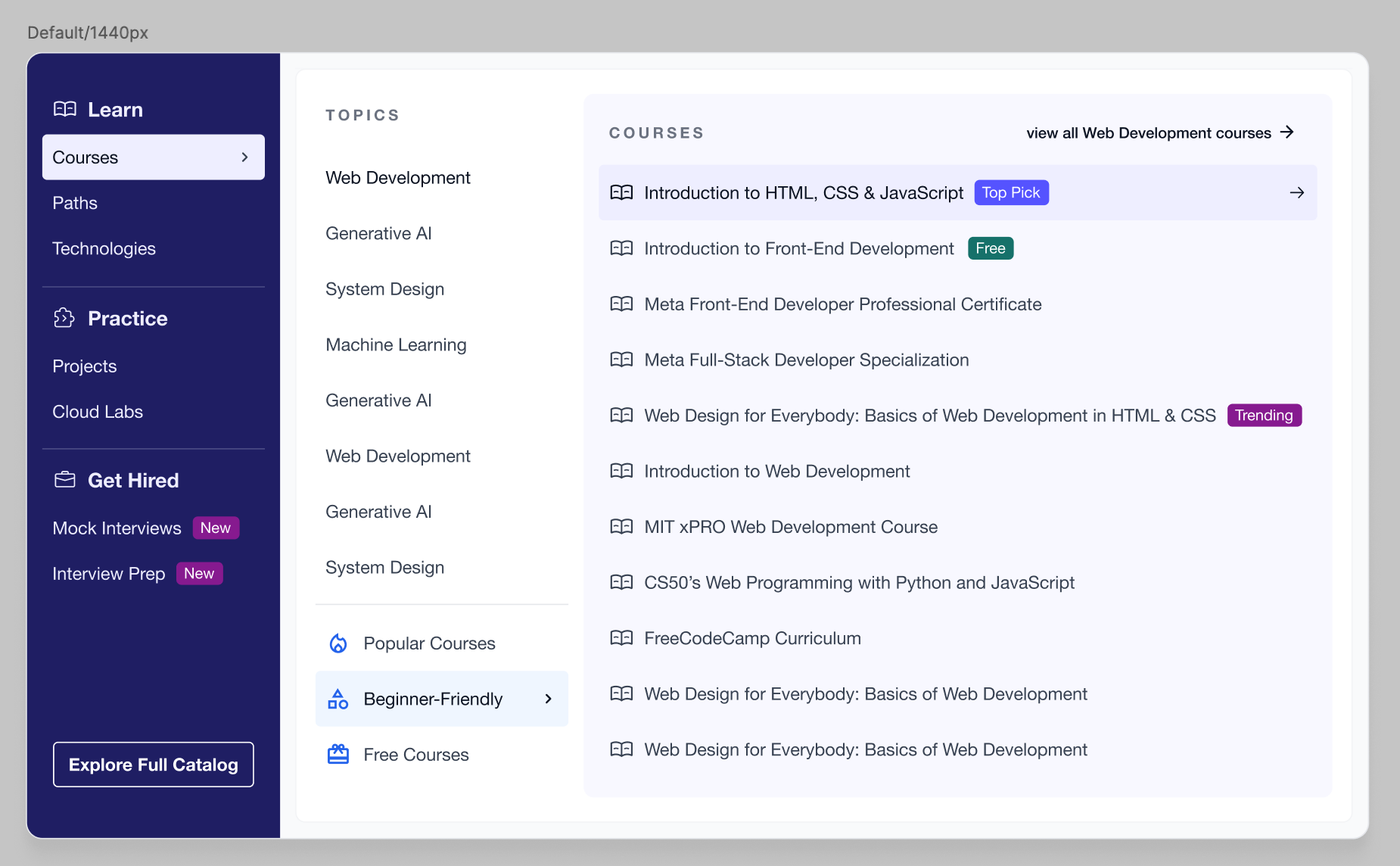
Using a light purple from the existing design system to separate L3 courses from L2 topics
08. Impact ✨
By transforming a basic dropdown into a structured mega menu with embedded content, we reduced friction, improved discovery, and made Educative’s value proposition visible in one glance. Following the revamp:
+3%
CTR to content
68% → 70%
−7%
Exit rates
23.22% → 21.85%
+96%
CUJ signups
2.51% → 4.99%
+27%
CUJ purchases
2.51% → 3.19%
CUJ purchases means a user searched for a course using the Explore dropdown and, in the same session, made a purchase.
Nearly doubling CUJ signups from a one-week navigation project showed how much value was trapped behind three clicks.
Retrospective
This project ran end to end in a single week, from spotting the opportunity in user behavior to handing off to engineering. That pace was only possible because the squad - PM, engineering and content authors - were in the room while the information architecture was being decided, rather than reviewing it afterwards.
The iteration I think about most is the darker L1. I personally preferred the minimal bento design, and the squad felt it read as too subtle to feel like a menu. I tried their version rather than defending mine, and the darker panel genuinely made the ecosystem easier to parse at a glance. The same thing happened again when leadership pointed out that the L3 container could disappear on lower resolution screens. Being willing to test feedback instead of arguing with it is what got this to a design that worked for everyone.
The other lesson was how much value a navigation surface can hold. A dropdown is easy to treat as plumbing, but it sits on every page and catches users at their highest intent. Restructuring it moved CTR, exit rate, signups and purchases all at once - a reminder that the most ordinary-looking surfaces are often the ones carrying the most weight.